GET THE DOWNLOAD

Enter your email — we'll send you the direct download link.

HomeOverviewFeaturesPricingFAQ

BOUNCE
ALL YOUR
Stems.

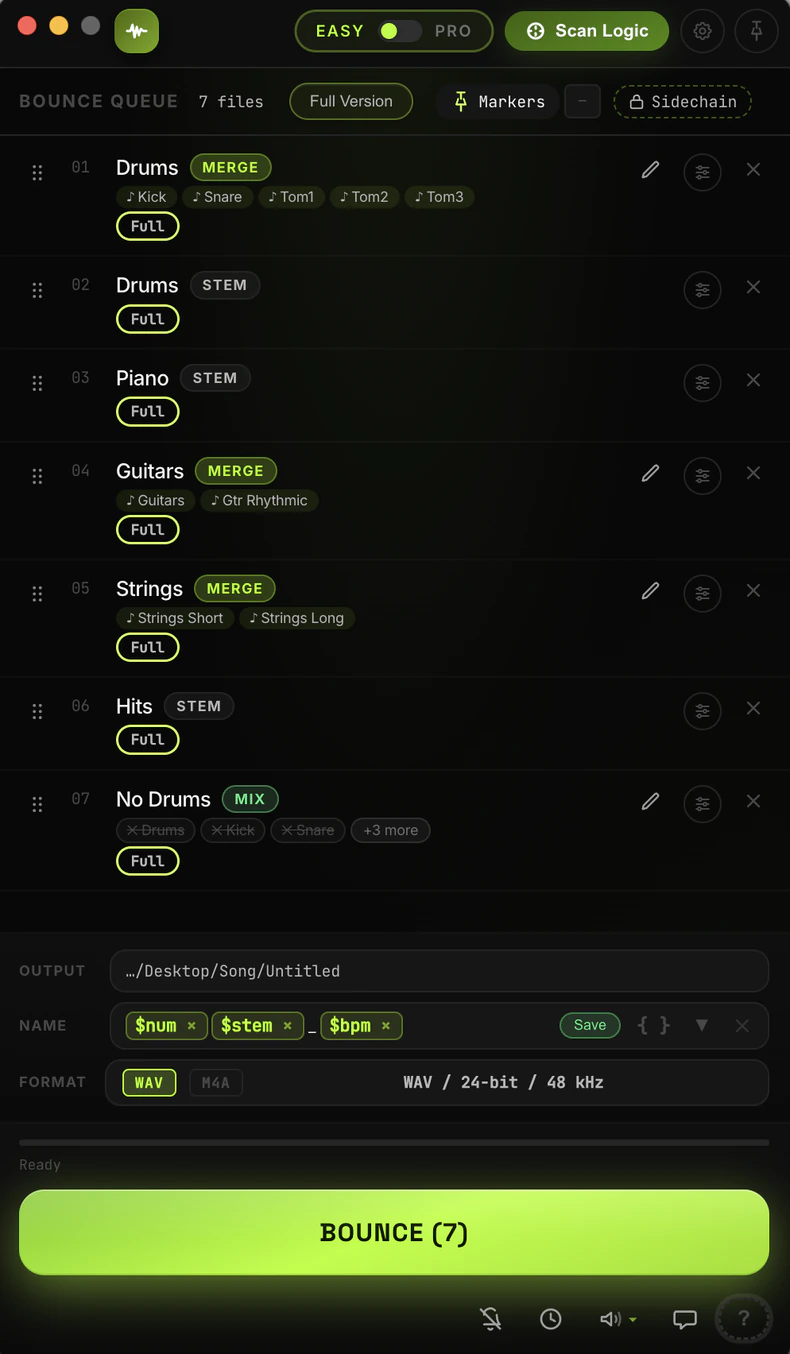
EasyBounce automatically renders every channel from your Logic Pro project. Hit one button. Walk away. Come back to a perfectly labeled folder of stems.

Untitled 2
EASY
⊙ Scan Logic
Theme
● Click
● Logic on
⊙ Scan Logic
?
CHANNELS5g / 21
Hidden
Audio
Inst
Aux
Bus
Input
Output
Master/VCA
MIDI
Drums5
Bass1
Guitars3
Vocals4
Strings6
VERSIONS:
No Drums
STEMS:
All Bass
All Drums
All Stems
All Synth
SETS:
Bla Bla
No Drums
+5 →
BOUNCE QUEUE  12 files
💾 Save set
↺ Reset all
Clear done
Clear all
All DrumsSTEMS5 stems
01Bass
STEM
PENDING
02Guitars
STEM
PENDING
03Vocals
STEM
PENDING
04No Drums
MIX✕ Drums✕ Kick✕ Snare✕ Hats✕ Cymbals✕ Toms
PENDING
05No Vocals
MIX✕ Vocals
PENDING
06Strings
STEM
PENDING
07Full Mix
MIX✓ All tracks
PENDING
OUTPUT
/Users/dbsound/Desktop
NAME
Name_Project_bpm_Cmaj_
🔒Sidechain
Kick Designer
⊞ Master plugins
FORMAT
WAV
MP3
WAV / 24-bit / 48 kHz
PRESET ▼
Ready
📂 Open folder in Finder
BOUNCE (12)
ACTIVITY
LOG
HISTORY
STATS
194
FILES BOUNCED
3h
51m
TIME SAVED
80
SESSIONS
59m
20s
TOTAL RENDER
~1.5 min saved per file vs manual bounce
6
BOUNCED
12
IN QUEUE
CURRENT JOB —

WATCH IT IN ACTION.

A 10-minute walkthrough — from scan to finished stems.

EasyBounce demo
How it works

FROM PROJECT TO STEMS IN 4 STEPS.

01 ——

Open & Scan Logic

Launch EasyBounce alongside Logic Pro. Hit Scan Logic and it reads every channel in your Mixer.

12 channels detected
Dark Matter EP.logicx
02 ——

Set Output Folder

Pick a folder once. EasyBounce auto-names every file using channel names from Logic.

Output: ~/Music/Stems/
Name: DarkMatter_
Format: WAV · 24-bit · 48kHz
03 ——

Build Your Queue

Select channels, click + Stems. Add mixes and versions. Save sets to reuse.

01 Kick · stem
02 All Guitars · stem
03 Instrument Mix · version
04 ——

Hit Bounce All

EasyBounce solos each channel, triggers Logic's bounce dialog, sets filename — all by itself.

Bouncing: Synth Lead
Kick · ✓ Snare · ✓ Bass
Features

EVERYTHING THOUGHT
THROUGH.

Auto Channel Scan

One click reads every track in your Logic Mixer — audio, instruments, Aux, Bus, Master. Color-coded, instant.

CHANNELS · 5g / 21● SCAN DONE
Mixer Audio Inst Aux Bus

Version Mixes

"No Vocals", "Drums Only" — EasyBounce bounces every variation automatically, muting the right channels.

BOUNCE QUEUE
04No Drums
MIX✕ Drums✕ Kick✕ Snare✕ Hats✕ Cymbals✕ Toms
PEND.
05No Vocals
MIX✕ Vocals
PEND.
06Strings
STEM
PEND.
07Full Mix
MIX✓ All tracks
PEND.

Metronome Guard

Detects if click track is on before bouncing. Your stems stay click-free.

Saved sessions more than once
⚠️
Metronome is ON
Turn Off & Bounce Cancel

Mini Mode

One click shrinks EasyBounce into a floating widget. Progress, timer, controls — all visible while Logic stays in focus.

EasyBounce ● Bouncing
03VocalsSTEM● NOW
04No DrumsMIXPEND.
05No VocalsMIXPEND.
BOUNCING 3/7
Bouncing... ~2:41 3/7

Format Presets

WAV, AIFF, CAF · 16/24/32-bit float · 44.1–192 kHz. Set once, every bounce.

FORMAT
WAVMP3
WAV / 24-bit / 48 kHz PRESET ▼
Ready
BOUNCE

Sidechain Lock

Pin a sidechain channel to every stem bounce. Essential for ducking-heavy mixes.

🔒Sidechain
Kick Designer
⊞ Master plugins
FORMAT
WAV
MP3
WAV / 24-bit / 48 kHz
PRESET ▼
Ready
BOUNCE (12)

Master Plugin Control

Bypass all master bus plugins before bouncing. One-click restore after.

⊞ Master plugins
Pro-L 2BYPASSED
SSL Bus CompBYPASSED
EQ EightACTIVE
Bypass All
Restore All

Bounce History

Full log of every session. Format, plugins, timestamp. One-click repeat.

LOG
HISTORY
STATS
Mar 27Dark Matter EP
8 stemsWAV 24-bitmaster bypass
Mar 25Sunrise Remix
12 stems + 3 mixesAIFF 16-bit
Mar 22Neon Drive
6 stemsWAV 32-bit

Compact Mode

Collapse the entire UI into a minimal single-column panel. Hotkeys still work — add tracks to the queue without breaking your focus.

COMPACT MODE ● Logic on
Add from Logic via hotkeys
01KickSTEMPEND
02BassSTEMPEND
03No DrumsMIX● NOW
BOUNCE (3)

Global Hotkeys

Three system-wide shortcuts — press from Logic to instantly add a stem, create a version mix, or merge tracks into one group. No switching windows.

⌥S
Stem Hotkey
Add selected Logic channel as stem
⌥V
Version Hotkey
Create "No [Track]" muted mix variant
⌥M
Merge Hotkey
Combine multiple tracks into one stem
Pricing

YOUR TIME.
Your choice.

Try it free. Rent it monthly. Own it forever.

Free Trial
$0
7 days · no card required

Try on the house
Full app, all features
No credit card required
Unlimited bounces during trial
⬇ Download Free Trial
Monthly
€9
per month · cancel anytime

Rent your time back
Full app while active
All features unlocked
Cancel anytime
Always latest version
Bounce history & repeat jobs
Sidechain lock support
Stops when sub ends
Subscribe — €9/mo →
Lifetime
BEST VALUE
€99
one-time · 1 Mac · yours forever

Buy once. Own it forever.
Everything in Trial
Free updates — forever
Priority support
Machine-bound license
Never pay again
Version Mixes & queue sets
Master plugin bypass control
Buy EasyBounce — €99 →
What producers say

REAL RESULTS.
Real producers.

★★★★★

"Bouncing is just off my plate now. I toss my tracks in the queue, hit start, and EasyBounce handles the rest. Honestly couldn't be happier with it."

Marco V.
Techno Producer · Berlin
★★★★★

"Finally I can send stems to labels without wasting studio time. Set it up, hit bounce, go make coffee."

Sofia R.
Music Producer · Stockholm
★★★★★

"It's wild how much time I save just from the notifications. The second a bounce is done I know about it — I never sit there waiting. I just keep working and jump back in when it's ready."

Lars K.
Mixing Engineer · Amsterdam
FAQ

QUESTIONS?

No questions found. Try different words.
General
What is EasyBounce?+
EasyBounce is a macOS app that automates bouncing stems and mixes in Logic Pro. Instead of manually soloing each track, opening the Bounce dialog, selecting format and folder — EasyBounce does it all for you, one by one, without any interaction.
How much time does EasyBounce save?+
With 10 stems you'd normally spend 15–20 minutes doing it manually. EasyBounce handles the same job with 1 click while you do something else.
Do I need to do anything in Logic before running EasyBounce?+
No. Just open your project in Logic, scan tracks in EasyBounce and hit Bounce. The app opens the Bounce dialog itself, sets the format, enters the filename and confirms — all automatically.
Getting Started
Why does EasyBounce need Accessibility permission?+
EasyBounce controls Logic Pro through macOS Accessibility APIs — it's the only way to automate Logic's UI without plugins or modifications. Without this permission the app cannot click buttons in Logic. On first launch macOS will prompt you — click Allow in System Settings → Privacy & Security → Accessibility.
Does EasyBounce access my audio files or project data?+
No. EasyBounce only controls Logic Pro's UI (clicks buttons, selects options). It has no access to your audio files or Logic project contents.
How does the free trial work?+
Download and get 7 full days of unrestricted access — every feature, unlimited bounces, no credit card required. The trial starts on first launch and is tied to your Mac.
Can I reset the trial by reinstalling?+
No. The trial date is stored in your Mac's Keychain — it persists even if you delete and reinstall. Contact us if you had technical issues during your trial.
Compatibility
Which versions of Logic Pro are supported?+
EasyBounce works with Logic Pro X (10.6, 10.7) and Logic Pro (10.8+). Both old and new interface versions are supported.
Which Macs are supported?+
Apple Silicon (M1, M2, M3, M4, M5) and Intel Macs — both. The DMG contains a universal binary that runs natively on either architecture.
Which macOS versions are supported?+
macOS 12 Monterey and newer. macOS 11 Big Sur may not be supported.
Does EasyBounce need an internet connection?+
Only for license activation. After activation the app works fully offline.
Does it work with Logic for iPad?+
No. EasyBounce uses macOS Accessibility APIs which are not available on iPad.
Does it work with other DAWs?+
No. EasyBounce is built specifically for Logic Pro on macOS.
Features
What bounce formats are supported?+
WAV, AIFF, MP3. You can configure bit depth (16, 24, 32 float), sample rate (44.1k, 48k, 96k and more), dithering, normalize, and interleaved/split stereo.
Can I bounce WAV and MP3 at the same time?+
Yes. In format settings there's a "PCM + MP3" option — Logic will save both files in a single pass.
What's the difference between a stem and a version mix?+
A stem is a single soloed track or bus (e.g. DRUMS, BASS, KEYS). A version mix is a specific combination of tracks — for example "No Vocals" or "Instrumental".
Can I set a custom filename template?+
Yes. In the Name Template field you can add a prefix — e.g. MySong_ or a date. Files will be saved as MySong_DRUMS.wav etc.
Is sidechain supported?+
Yes. You can specify a sidechain channel — EasyBounce solos it alongside the main stem during bounce. Essential for ducking-heavy sessions.
Are settings saved between sessions?+
Yes. All stem presets, format settings and your queue are saved automatically.
How many channels can it process?+
Unlimited. EasyBounce scans your entire Logic Mixer and can queue any number of channels — 1 or 100.
Does it support Aux, Bus, and Master channels?+
Yes — audio tracks, software instruments, Aux, Bus, and Master. You can filter by channel type in the list.
What if my metronome is on?+
EasyBounce checks for an active metronome before starting. You'll see a warning with three options: Turn Off & Bounce, Bounce Anyway, or Cancel.
Can EasyBounce run fully in the background?+
Partially. The bounce process continues if EasyBounce is in the background, but Logic's window must remain accessible (not covered by other windows). Don't minimize Logic to the Dock during a bounce.
Does it support Bounce in Place?+
No. EasyBounce uses Logic's standard File Bounce (Cmd+B) only.
Can EasyBounce edit my Logic project?+
No. EasyBounce only triggers the bounce — it does not move tracks, change plugins, or edit your arrangement in any way.
Does EasyBounce support keyboard hotkeys?+
Yes — three system-wide hotkeys work globally from Logic Pro. The Stem hotkey adds the selected channel as a stem. The Version hotkey creates a muted mix variant (e.g. "No Drums"). The Merge hotkey groups multiple selected tracks into a single combined stem. All three are fully customizable in Settings.
What is Compact Mode?+
Compact Mode collapses EasyBounce into a minimal single-column panel — no sidebars, no stats. It takes up much less screen space but all hotkeys and the queue remain fully functional. Great for small screens or when you want Logic front and center.
Can I save my stem setup for future sessions?+
Yes. You can save the entire queue as a named set — e.g. "Full Delivery", "Client X", "Interscope". Load it in one click next session and all stems, mixes, and versions are back in the queue exactly as you left them.
What is the Merge feature?+
Merge lets you combine multiple Logic channels into a single bounced stem. Select the tracks, press the Merge hotkey or drag them into the merge zone, give the group a name — EasyBounce bounces all of them soloed together into one file.
What is Easy Mode?+
Easy Mode simplifies the UI by hiding advanced controls — Pro Mode features like the stats panel, mixer filters, and version tags are dimmed or collapsed. It's designed for producers who want a clean two-click workflow without the extra options.
Can I reorder the bounce queue?+
Yes. Drag and drop any item in the queue to change the order. You can also group items into sets and reorder entire groups.
Does EasyBounce track how much time I've saved?+
Yes. The Stats panel shows total files bounced, total time saved, number of sessions, and render time. It calculates roughly 1.5 minutes saved per file compared to doing it manually in Logic.
Troubleshooting
Why does the scan not find my tracks?+
Make sure Logic is open with an active project. If tracks are in collapsed groups, EasyBounce will automatically expand them during scanning.
Bounce completed but the file didn't appear — what do I do?+
Check the output folder set in EasyBounce. If the folder is correct, try the ↺ Retry button in the app.
EasyBounce froze during a bounce — what do I do?+
Press ✕ Cancel in EasyBounce. If it doesn't respond, Cmd+. will stop the render in Logic — then you can restart.
EasyBounce stopped working after a Logic update — what do I do?+
Reinstall EasyBounce from the latest DMG. Major Logic updates sometimes change the UI — we update EasyBounce accordingly. Check for updates at easybounce.app.
What if Logic crashes mid-bounce?+
Every stem already rendered is saved to disk — nothing is lost. You can resume from where you left off.
License & Payment
Can I use it on multiple Macs?+
One license = one Mac. If you get a new Mac, email us and we'll transfer the license at no extra charge.
Is there a refund policy?+
EasyBounce offers a full 7-day free trial so you can evaluate it completely before buying. Because of the nature of digital software, all sales are final once a license key has been activated.
Do I get free updates?+
Yes — all future updates are included forever. EasyBounce checks for updates automatically on launch.

STOP CLICKING.
START MAKING.

Every hour you spend manually bouncing stems is an hour not spent making music.

⬇ Download EasyBounce

7-day free trial · No credit card · macOS only · One-time €99

Legal

Privacy Policy

Last updated: April 15, 2026

Legal

Terms of Service

Last updated: April 15, 2026